


GuitarTuna: Tune & Play Guitar
4.574.28K Reviews
App Specs
- Version
- 7.99.0
- Updated On
- License
- Free
- Downloads
- 100,000,000+
- Developer
- Yousician Ltd.
- Categories
- Tools
- Platform
- Android, iOS
Screenshots

 Analysis by AppCompare
I’d start by asking what I need from a guitar app on an ordinary day. If I only want to check tuning before playing, a dedicated tuner may be enough; if I also want help with chords and practice, having those tools together can be more convenient. That balance is what makes GuitarTuna: Tune & Play Guitar worth considering. It is a free tools app from Yousician Ltd., with optional in-app purchases, so I can try the basic experience without paying upfront and decide later whether its wider features suit me.
The practical question is not whether an app can replace every lesson or piece of music gear. It is whether I can open it, tune without fuss, and find something useful when I have a few minutes to practise. GuitarTuna aims to cover that small but recurring routine. It has been available since 2012, and its current version is 7.88.0; it works on devices running Android 8.0 or later. Its age rating is Everyone, which makes the app broadly accessible, though younger players will still benefit from guidance when learning technique.
A quick check before choosing a tuner
I would judge a phone tuner by a few everyday details: can I see whether a note is sharp or flat, does it respond clearly in the room where I actually play, and can I get started without navigating a maze? GuitarTuna’s appeal is that tuning is the obvious starting point rather than a hidden extra. The microphone-based approach is convenient when I do not have a clip-on tuner nearby, but it also means the phone needs to hear the instrument clearly. A quiet corner and a single string played at a time are sensible habits, especially if other instruments or conversation are nearby.
Guides and Analysis on GuitarTuna: Tune & Play Guitar
That distinction matters because a phone is not the right answer for every setup. A clip-on tuner can be easier to read in a noisy rehearsal, and a pedal tuner may make more sense for a guitarist who needs hands-free tuning in a live signal chain. I see GuitarTuna as a handy personal practice tool, not an automatic replacement for dedicated stage equipment. If the room is loud, I would first move closer to the phone or reduce surrounding sound rather than assume the app can overcome every acoustic problem.
Useful beyond the first tuning session
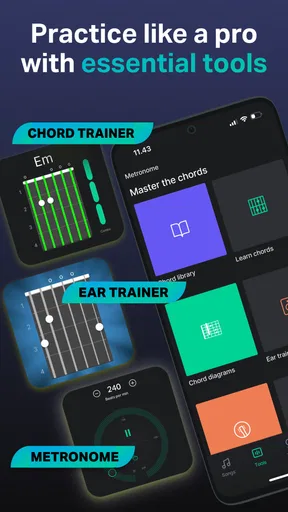
The app’s wider appeal is its mix of tuning and learning aids. Its chord library can help me check a shape while I am working through a song, while a metronome gives a practice session a steadier pace. Those tools are most useful when I give them a specific job: look up one unfamiliar chord, set a manageable tempo, and repeat a short passage cleanly before trying the whole song. That is more productive than opening several features at once and losing track of what I meant to practise.
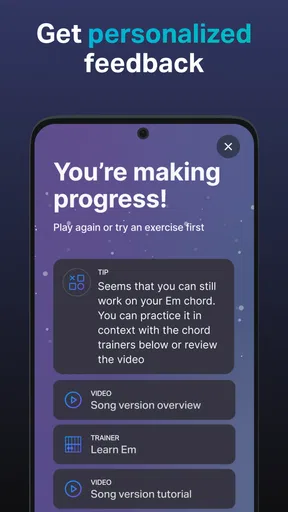
For a beginner, the chord reference can make a frustrating moment less of a dead end. If a chord sounds muted, I can compare my hand position with the diagram and check whether a finger is touching a neighbouring string. It will not see my hand or tell me exactly what I am doing wrong, so I still need to listen carefully and adjust. That limitation is useful to remember: a visual guide supports practice, but it does not provide the personal correction of a teacher watching me play.
Where another option may suit you better
Compared with a simple tuner app, GuitarTuna is appealing when I want tuning plus practice references in the same place. The trade-off is that a broader app can feel like more than I need if I only tune occasionally. Someone who already has a tuner they trust and learns from printed music, a teacher, or another practice routine may gain little from switching. Likewise, players who need advanced recording, detailed instrument setup, or a full course should check that those needs are met elsewhere rather than treating a tuner as an all-in-one music studio.
Worth Reading Before You Choose

Switching to Android Auto Means Rethinking Your Driving Routine

Google Calendar Makes a Crowded Week Easier to Manage

Ludo King Makes the Most of the Minutes Between Plans

Baby Panda World Brings Quick Play to Modern Phones, but Its Game Library Feels Busy

ESPN’s Live Game View Makes Following Close Games Easier

QuizzLand Review: A Good Fit for Short Trivia Breaks, Not Every Player
The free starting point lowers the commitment, but optional purchases mean I would check what is included before building a routine around a paid feature. In-app purchase prices range from $0.99 to $139.99 per item, a wide span that makes it sensible to review the specific offer shown in the app instead of assuming every lesson or tool is included. I would begin with the tasks I actually need—tuning, a chord check, or keeping time—and only consider paying if I repeatedly use something that requires it.
Getting Started with GuitarTuna
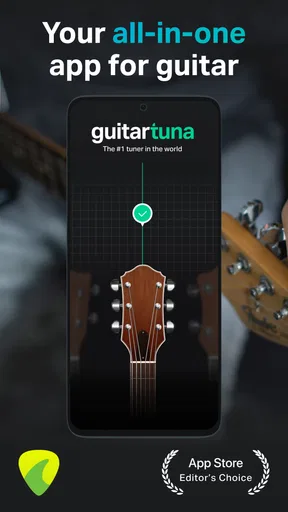
The first thing you'll notice about GuitarTuna: Tune & Play Guitar is its user-friendly interface. The setup is straightforward and doesn’t bombard you with unnecessary features, which is a huge plus. After downloading the app from the App Store or Google Play, you can jump right into tuning your instrument.
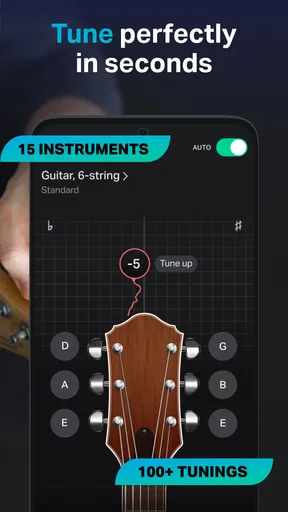
One of the best things about GuitarTuna is how it caters to various instruments. While it’s primarily known for guitars, you can also use it to tune bass guitars, ukuleles, violins, and more. This versatility makes it a handy tool for any musician.
Features That Make GuitarTuna Stand Out
GuitarTuna is more than just a tuner. It offers a variety of features that enhance your practice sessions. Here’s what stood out to me:
- Precision Tuning: The app uses the built-in microphone of your device to deliver highly accurate tuning. The visual feedback is clear, showing you exactly when your string is in tune.
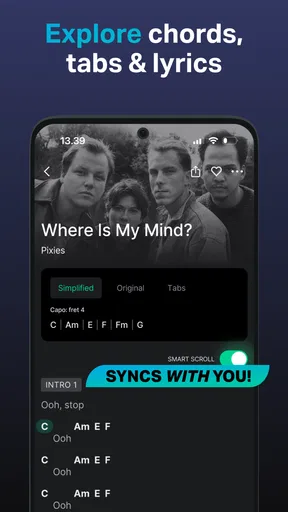
- Chord Library: Need to learn new chords? GuitarTuna has a comprehensive library that’s perfect for expanding your repertoire.
- Metronome and Games: A built-in metronome helps you keep time, while fun mini-games improve your rhythm and ear training.
- Noisy Environment Mode: This nifty feature ensures accurate tuning even in loud surroundings, making it ideal for gigs or jam sessions.
My Personal Experience
Using GuitarTuna was an absolute breeze. As someone who often plays in different settings, the Noisy Environment Mode was a lifesaver. I tried it out during a particularly loud band practice, and it worked flawlessly. The tuner responded quickly, and the accuracy was spot-on.
Another feature that I found incredibly useful was the chord library. As I was learning a new song, having the chords available at my fingertips helped speed up the process. It felt like having a guitar teacher right in my pocket.
A routine that works in real life
My most useful approach is to treat the app as a short practice companion rather than a reason to keep scrolling. Before playing, I tune each string in turn and pause briefly between notes so the microphone can focus on one sound. Then I choose one chord or passage to work on, check the fingering if needed, and use a steady beat while repeating it. That sequence turns a spare ten minutes into a clear session instead of a vague intention to practise.
It also helps to check tuning again after moving the guitar between rooms or after a long session. Changes in temperature and playing can affect how an instrument feels and sounds, and a quick check is less distracting than discovering a problem halfway through a song. For a shared household, I would keep the phone close to the instrument and avoid placing it beside a speaker; the tuner depends on hearing the strings, not on reading the guitar’s physical vibration.
One non-obvious trade-off is that convenience can encourage overreliance on visual feedback. I find it better to use the display to get close, then listen to a familiar chord or reference sound. That habit builds my ear instead of making every tuning decision depend on the screen. The app’s practice games can add variety, but they work best as a brief warm-up or break; they are not a substitute for repeating the chord changes that are actually slowing me down.
Who will get the most from it
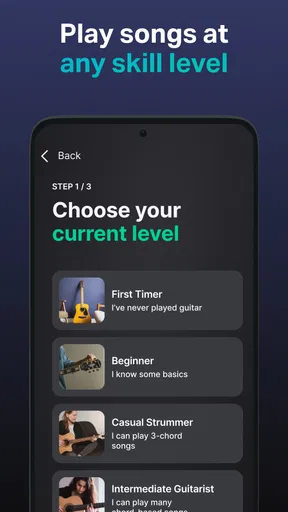
I would recommend it most readily to a new guitarist who wants one approachable place to tune and look up chord shapes, or to a casual player who often practises away from a dedicated music setup. A parent helping a child start guitar may also find the clear tuning display less intimidating than a traditional tuner’s small indicators. Since the app is rated for Everyone, it is broadly suitable, although that rating is not the same as a lesson plan: beginners still need patient instruction on posture, finger pressure, and avoiding strain.
Players who move among guitar, bass, ukulele, or other supported instruments may appreciate not needing a separate reference for every session. The key is to verify the selected instrument and tuning before adjusting strings. If the app is listening for a different instrument or tuning than the one in hand, the display can be confusing and lead to unnecessary adjustments. I would make that check a habit, particularly when switching between instruments during a group practice.
On the other hand, I would skip it if I want a completely minimal tuner and have no interest in the learning tools, or if I need a dependable hands-free tuner in a loud performance environment. A dedicated clip-on or pedal is a better fit in those cases. I would also choose a structured course or in-person teacher if my main goal is a progressive learning plan with feedback on posture and technique. GuitarTuna can make practice easier to start, but it cannot listen to my playing and correct every underlying habit.
What switching really involves
Trying the app does not require replacing a physical tuner or abandoning a practice method that already works. I can use it alongside my usual setup: the phone for a quick check at home, a clip-on tuner when I need a screen attached to the instrument, and a teacher or course for deeper instruction. That low-pressure approach is a good way to find out whether the chord reference and practice tools earn a regular place in my routine.
If I already use another phone tuner, the main switching cost is not technical; it is remembering where my familiar settings and workflow are. I would compare the readability of the tuning display, how well it handles the room I play in, and whether I actually use the extra practice features after the novelty wears off. A large catalogue of tools has no value if I only need a fast tuning check. Conversely, if I repeatedly reach for chord help and a metronome, keeping them beside the tuner can reduce interruptions.
GuitarTuna has a 4.5 average from around 2.6 million ratings and has passed 100 million installs, so it is a widely used choice rather than an obscure utility. Those figures can reassure someone who wants an established app, but they do not tell me whether its approach fits my instrument, room, or learning style. I would still make the decision based on the actual tuning workflow and the features I expect to use.
My recommendation
Overall, I see GuitarTuna as a practical starting point for keeping an instrument in tune and making short practice sessions easier to organize. Its strongest case is convenience: a clear tuner paired with chord help and rhythm tools can keep a beginner from bouncing between unrelated references. Its weaker case is for musicians who need specialist performance hardware, a deeply structured course, or nothing beyond a bare-bones tuner.
If that sounds like your situation, I would install it, try tuning in the places where you usually play, and build a small routine around one chord or passage. Keep a dedicated tuner for noisy gigs if that is part of your life, and check any paid feature before spending. For me, it is worth keeping when I use more than the tuner; if all I want is a quick pitch check, a simpler alternative may be the better choice.
Final Thoughts
All in all, GuitarTuna is a must-have app for any musician. Its combination of precision, versatility, and ease of use makes it a standout amongst other tuning apps. Whether you’re tuning before a gig or practicing at home, GuitarTuna ensures that your instrument sounds its best.
If you haven’t tried it yet, I highly recommend downloading GuitarTuna and giving it a go. It’s a fantastic tool that will undoubtedly become a staple in your music toolkit. Happy tuning!
Pros
- User-friendly interface
- easy to navigate.
- Accurate tuning for multiple instruments.
- Includes chord library and metronome.
- Supports both electric and acoustic guitars.
- Offline mode available for convenience.
Cons
- Ads can be intrusive at times.
- Some features locked behind paywall.
- Limited free version capabilities.
- Occasional app crashes reported.
- Might be overwhelming for beginners.
FAQs for GuitarTuna: Tune & Play Guitar
What features does GuitarTuna offer for tuning instruments?
GuitarTuna provides a comprehensive tuning experience for a wide variety of string instruments, including guitars, basses, ukuleles, and more. It features an accurate tuner, chord library, and metronome. The app supports alternate tunings and offers a simple interface, making it easy for beginners and seasoned musicians alike.
Is GuitarTuna suitable for beginners?
Yes, GuitarTuna is very beginner-friendly. It offers an intuitive interface with easy-to-follow instructions, making it simple for newcomers to start tuning their instruments. Additionally, it includes helpful features like chord diagrams and a metronome, which are great tools for beginners learning to play.
Does GuitarTuna require an internet connection to function?
GuitarTuna primarily works offline, allowing users to tune their instruments without an internet connection. However, some features, such as downloading additional tuning modes or accessing certain lessons, may require internet access. This makes it versatile for both offline and online use.
Are there any in-app purchases or subscriptions in GuitarTuna?
While GuitarTuna offers a free version with basic tuning features, it also includes optional in-app purchases and subscriptions. These can unlock advanced features such as additional tuning options, games for improving skills, and more extensive chord libraries. Users can choose based on their specific needs and budget.
How accurate is the tuning provided by GuitarTuna?
GuitarTuna is known for its high accuracy, using the latest audio recognition technology to ensure precise tuning. It’s widely trusted by both amateur and professional musicians. The app’s advanced algorithms help detect minute changes in pitch, providing reliable results for a variety of instruments.


